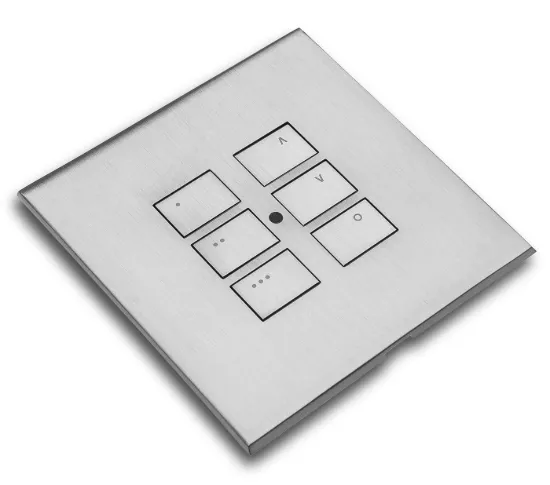
The Rako RK-EOS-6 and WK-EOS-6 are both six-button keypads in Rako's EOS style, and from the front they belong to the same family. The difference is the system behind them. The RK-EOS-6 is a battery wireless module for wireless Rako systems. The WK-EOS-6 is a wired module for CAT5 / Rakom wired systems. This guide explains how to choose between them, and the cover plate kit each one needs.
If you're new to Rako, start with our guide to what Rako is and how it works, then come back here to choose your keypad.
The short answer
- Wireless Rako system: choose the Rako RK-EOS-6.
- Wired Rako system (CAT5 / Rakom wired): choose the Rako WK-EOS-6.
- Either way, you also need the matching cover plate kit. The kit forms the buttons, and it's ordered separately from the module.
- Not sure which system you have: ask your Rako installer, or tell us about your project through our Rako project form.
What makes a keypad "EOS"?
EOS is a Rako keypad style with a screwless metal finish. It's available for both wired and wireless systems, and the cover plate is separate from the module behind it. That split is why every EOS keypad order has two parts: the module that does the work and the cover plate kit that you see and press.
You can browse the full Rako EOS range and the available Rako finishes to see how the plates look.
Rako RK-EOS-6: the wireless six-button keypad
The RK-EOS-6 is a battery-powered wireless six-button module for wireless (Rakom RF) Rako systems.
- Six buttons, each able to send commands to several rooms.
- NFC programmed in RASOFT Pro, as part of commissioning.
- Fits a standard UK single-gang back box.
- Needs a separate RP-EOS cover plate kit, which forms the buttons.
Because it runs on battery and talks to the system wirelessly, the RK-EOS-6 is the keypad for wireless Rako projects. If your system is wired, look at the WK-EOS-6 instead.
Rako WK-EOS-6: the wired six-button keypad
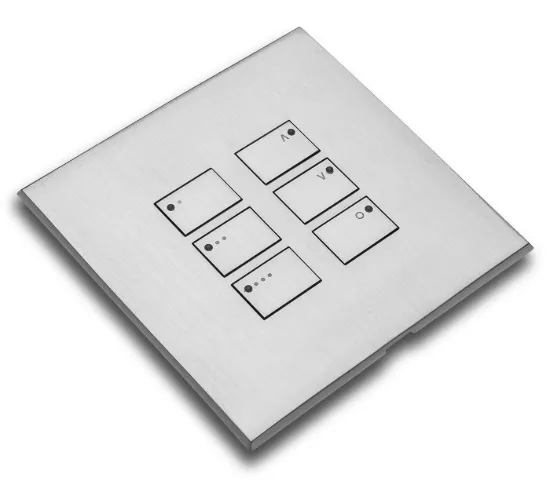
The WK-EOS-6 is a six-button wired module for CAT5 / Rakom wired systems.
- Six buttons with multi-room control, set up in RASOFT Pro.
- Powered from the wired network, so there's no battery.
- Needs a separate WP-EOS cover plate kit, which forms the buttons.
If your Rako system is wired, this is the six-button EOS keypad to plan around.
RK-EOS-6 vs WK-EOS-6 side by side
- System type: the RK-EOS-6 is for wireless (Rakom RF) systems. The WK-EOS-6 is for CAT5 / Rakom wired systems.
- Power: the RK-EOS-6 is battery powered. The WK-EOS-6 is powered from the wired network.
- Buttons: both have six.
- Multi-room control: the RK-EOS-6's buttons can send commands to several rooms. The WK-EOS-6 has multi-room control in RASOFT Pro.
- Set-up: the RK-EOS-6 is NFC programmed in RASOFT Pro. The WK-EOS-6 is set up in RASOFT Pro.
- Back box: the RK-EOS-6 fits a standard UK single-gang back box.
- Cover plate: the RK-EOS-6 needs a separate RP-EOS cover plate kit. The WK-EOS-6 needs a separate WP-EOS cover plate kit. In both cases the kit forms the buttons.
Both keypads share the EOS look and six-button layout, so the choice comes down to the type of Rako system they're joining.
Don't forget the cover plate kit
This is the detail that catches people out most often. Neither module is a complete keypad on its own: the cover plate kit forms the buttons, and it's a separate item.
- RK-EOS-6: add an RP-EOS cover plate kit.
- WK-EOS-6: add a WP-EOS cover plate kit.
Shop the RP-EOS-6 cover plate kit for the RK-EOS-6, or the WP-EOS-6 cover plate kit for the WK-EOS-6, in seven finishes.
The plate is also where you choose the look, so it's worth browsing the Rako finishes before you finalise the order. Your installer can confirm the exact plate kit for each keypad position.
Surface mounting: the XCE-EOS-SB
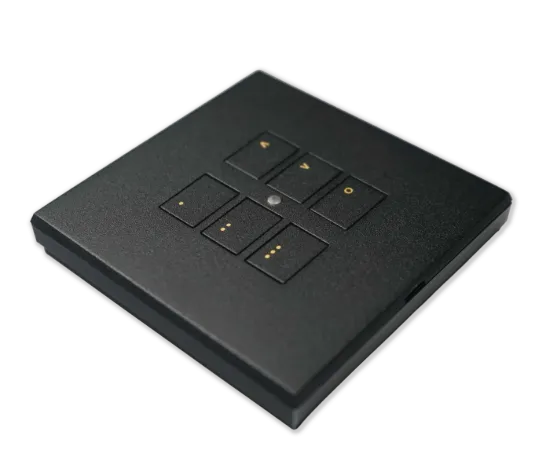
The Rako XCE-EOS-SB is an optional accessory, not a keypad. It's a surface-mount pattress for RK-EOS and WK-EOS keypads with EOS screwless plates, available for UK and EU boxes. Your installer will tell you whether any keypad positions need it.
Adding app, voice and timed control
Keypads give you control on the wall. If you also want the Rako app, voice control or timed events, add a hub that matches your system: the RK-HUB for wireless systems, or the WK-HUB for wired and hybrid systems. Our Rako RK-HUB vs WK-HUB guide explains the choice.
Which EOS keypad do I need for a wired system?
The WK-EOS-6. It's the six-button EOS module for CAT5 / Rakom wired systems, and it's powered from the wired network. Remember to add the WP-EOS cover plate kit.
Which EOS keypad do I need for a wireless system?
The RK-EOS-6. It's the battery wireless six-button module for wireless (Rakom RF) systems, and it fits a standard UK single-gang back box. Remember to add the RP-EOS cover plate kit.
Common mix-ups to avoid
- Ordering the module without the cover plate kit. The kit forms the buttons, so the keypad isn't complete without it.
- Ordering the wrong plate kit. The RK-EOS-6 takes an RP-EOS cover plate kit and the WK-EOS-6 takes a WP-EOS cover plate kit.
- Choosing the RK-EOS-6 for a wired system, or the WK-EOS-6 for a wireless one. Match the keypad to your system type.
- Expecting a battery in the WK-EOS-6. It's powered from the wired network.
- Treating the XCE-EOS-SB as a keypad. It's a surface-mount pattress, and only needed where your installer specifies it.
- Expecting app or voice control from a keypad alone. Those come through the RK-HUB or WK-HUB.
Who designs and sets up the keypads?
We supply the parts. A Rako installer designs and commissions your system, including what each button does and which rooms it controls. Keypads can run curtains and blinds too: see Rako curtains and blinds. If you're still planning, send us the details through our Rako project form. You can also compare the EOS keypads with the rest of our Rako keypads.
Shop the EOS keypads or plan a project
Know your system type? Go straight to the Rako RK-EOS-6 for wireless systems or the Rako WK-EOS-6 for wired systems, then choose your plate from the Rako finishes. You can also browse the full EOS range and the wider Rako range.
Still working it out? Tell us about your project using the Rako project form.