Shelly names can read like a catalogue of codes. Gen3, Gen4, 1PM, Pro, BLU, Wave. The generation number matters less. The useful split is the body and the radio. If you are weighing up Shelly Mini vs Pro, or wondering where BLU and Wave fit, the name on the device tells you the shape and the radio: where it lives in the house, and how it talks. Behind The Switch is an independent UK seller of Shelly products, and this guide is a map of the range as we sort it. If you only want a smart light behind an existing plate, read how to fit a Shelly Mini behind a UK light switch first.

The room at dusk already has its switch on the wall and a lamp on the side. Every choice below starts from what is already in the house.
Start with where it will live
Before looking at models, decide where the device will sit. That single choice rules most of the range in or out. A relay behind a switch and a relay in a consumer unit can do similar jobs, but they are shaped for different places, and they are fitted by different routes.
Most UK homes offer four possible places:
- Behind an existing plate, in the back box where the switch already is.
- On a DIN rail in the consumer unit, alongside the breakers.
- Somewhere with no wiring at all: a button on a wall or a sensor on a door frame, not wired into the load it controls.
- On a Z-Wave controller that is already running in the house.
Each place maps to one body. Mini sits behind the plate. Pro sits on the DIN rail. BLU covers buttons and sensors that talk over Bluetooth. Wave is for a home that already uses Z-Wave. The generation number, Gen3 or Gen4, tells you how new a body is. It does not change where it lives.
Some homes use more than one. A Mini in the hallway and a BLU button by the bed can control the same light from two directions. Starting with the place, though, stops you buying a device that has nowhere to go.
The rest of this guide takes each place in turn, then ends with a short way to choose.
Mini: behind the switch
A Mini is a small relay built to sit in a UK back box, behind the switch you already have. The plate stays on the wall. The switch still works as it always did, and the light gains app control, schedules and automations on top.
If you run Home Assistant, Wi-Fi Minis work with it on your local network. Our Shelly and Home Assistant guide explains what keeps working without the internet.
Minis talk over Wi-Fi, so they join your home network directly and are added in the Shelly Smart Control app. Current bodies usually carry Bluetooth as well, which helps during setup and, on some models, lets them work with BLU buttons and sensors. Check the product page for what a given Mini supports.
For a single lighting circuit, the Shelly 1PM Mini Gen4 is the usual starting point. It switches one load and suits the job most people have in mind when they search for a smart light switch without changing the switch.
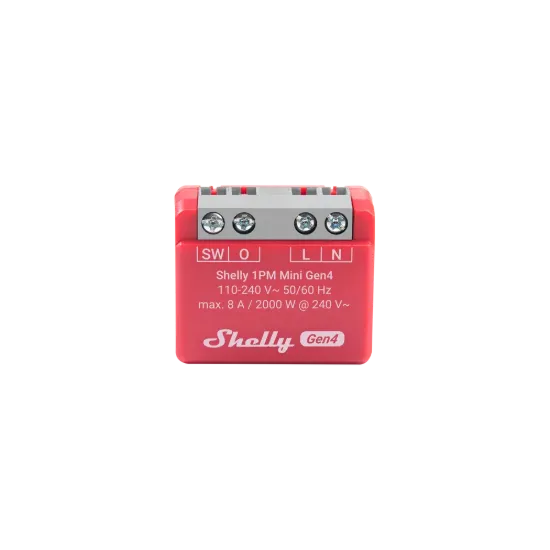
This is the 1PM Mini Gen4 on its own, before fitting. It is designed to sit out of sight in the box, not on the wall.
The main choice within the Minis is whether you want power readings. A PM model reads power, so you can see what the load draws and spot a light left on. The 1 Mini does not read power. It switches the load and nothing more. If you have no interest in energy figures, that is a fair choice. Beyond that, fitting is covered in the first guide, so this one stops here.
Other Mini bodies exist for different loads and older generations. You can compare them in the Mini relays.
A Mini is mains equipment, so it should be fitted by someone competent to work on UK lighting circuits; nothing here is electrical advice.
When the back box is too tight, or you want several circuits in one place, a Mini is the wrong answer. That leads to Pro.
Pro: on the DIN rail
A Pro is a DIN-rail body. It clips onto the rail in a consumer unit, alongside the breakers, rather than hiding behind a switch. The switches in the rooms can stay as they are.
Pro makes sense in two situations. The first is when you want several circuits controlled from one place: lighting for a whole floor, an outside circuit, or loads spread across the house. The second is when the wall boxes are too tight for a Mini, which is common in older homes with shallow boxes.
The Shelly Pro 4PM is the clearest example. It is a four-channel device, so one body handles four separate circuits, each with its own power reading. For a consumer unit where space on the rail matters, that is tidier than four separate devices.
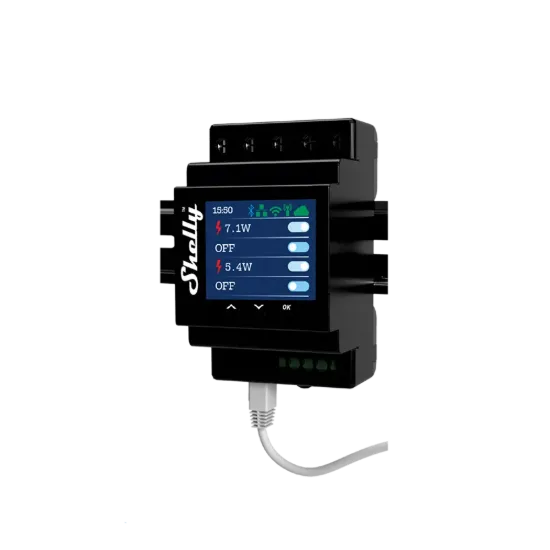
Its rail-mounted body is shaped for a consumer unit rather than a back box. It is wider than a Mini because it carries four channels.
If you only need one or two circuits on the rail, the Shelly Pro 1 is the single-channel Pro and the Shelly Pro 2 the two-channel version. Neither reads power; the Pro 4PM does. They suit a load you would rather control from the consumer unit, such as an outside light or a circuit with no room behind the switch.
Pro devices talk over Wi-Fi, and many also offer a wired network connection. The product page lists the connections, current ratings and supported loads for each model, and those are the figures to check, not a summary here.
Fitting a Pro is consumer-unit work. It is a job for an electrician, and it is often done alongside other work on the board. If you are not planning that kind of visit, a Mini behind the switch is usually the simpler route.
To see the full DIN-rail range, browse the Pro devices.
BLU: buttons and sensors on Bluetooth
BLU is the Bluetooth side of the range. These are buttons and sensors, not mains relays. They do not go in a back box or a consumer unit, and they are not wired into the load they control. They run on batteries and send a signal when something happens: a press, a movement, a door opening.
The Shelly BLU Button1 Tough is the simplest example. It is a small, rugged wireless button you can put by a bed, on a desk, or next to a door. A press can tell a relay elsewhere in the house to turn a light on or off.

The Button1 Tough is a compact, single-button device, small enough to sit on a bedside table or fix to a wall.
It is worth being precise about how BLU works. BLU devices talk Bluetooth, not Wi-Fi. Within Bluetooth range, a compatible Shelly device can hear them directly. To act on a press from another room, or to reach a BLU device when you are away from home, you need a gateway. That gateway can be the dedicated Shelly BLU Gateway, or another Shelly Wi-Fi device that can act as one.
So BLU does not need a separate hub in the way some systems do, but it does need something on Wi-Fi to pass its messages on beyond Bluetooth range. Check the product page for which devices can act as a gateway, and for range. Walls, floors and distance all affect Bluetooth, so the right answer depends on your house.
BLU is a good fit when you want control somewhere with no wiring. A button by the bed saves adding a new switch. A motion sensor on a landing can bring a light on at night without anyone touching anything.
Motion and door sensors are listed with the other sensors, and you can browse the full Bluetooth range in the BLU devices.
Wave: when the house already speaks Z-Wave
Wave is Shelly's Z-Wave range, sold as Shelly Qubino Wave. Z-Wave is a separate wireless standard that works through a Z-Wave controller, not through your home Wi-Fi.
Wave makes sense only if a Z-Wave controller already runs your home. The devices join that network and are managed from the controller, not from the Shelly Smart Control app. We don't currently stock the Wave range.
If the house has no Z-Wave controller, a Mini behind the switch or a Pro on the DIN rail gives you app control over Wi-Fi without buying a controller first.
A simple way to choose
If you have read this far, the choice usually comes down to one question: where will the device live? Answer that, and the body follows.
- Existing switch, keep the plate. Choose a Mini. It sits in the back box, the switch stays, and the light gains app control and schedules.
- Consumer unit, or several circuits. Choose a Pro. It sits on the DIN rail, handles one or more circuits from one place, and is fitted by an electrician.
- Wireless button or sensor, no new wiring at the load. Choose BLU. It talks Bluetooth and needs a gateway to reach beyond Bluetooth range or away from home.
- Already on Z-Wave. Wave joins the controller you already have. We don't currently stock it.
These are not exclusive. Many homes end up with a mix: Minis in the rooms where the plates matter, a Pro for circuits that are easier to handle at the board, and a few BLU buttons where there is no wiring at all. Start with the one job you most want to solve, then add to it.
If you want dedicated wall keypads and designed lighting scenes rather than relays behind existing switches, read Rako or Shelly.
Whatever you choose, check the specification and manual on the product page before buying.
To compare the relay bodies side by side, browse all relays. For motion, door and BLU sensors, see the sensors category.