Yes, Shelly works with Home Assistant. Home Assistant finds Shelly devices on your local network and controls them without the cloud, which is one of the main reasons Shelly is popular with Home Assistant users in the UK. This guide covers how that local control works, what keeps running if your internet goes down, whether you need a hub, and which Shelly devices make a sensible starting point.
If you're new to the brand, our guide to what Shelly is covers the basics. This post focuses on using Shelly with Home Assistant.
The short answer
- Home Assistant finds Shelly devices on your local network and controls them without the cloud.
- Wi-Fi Shelly devices connect straight to your router, so there's no hub to buy.
- Wall switches, schedules and actions set on the device, and Home Assistant control all keep working on your home network if the internet is down.
- You need the internet for control away from home and for most voice-assistant links.
- Check your back box first: most Mini relays need a neutral, and the Shelly 1L Gen3 is the no-neutral option.
How Shelly works with Home Assistant
Home Assistant runs on your home network, and so do Wi-Fi Shelly devices. Home Assistant finds them on the local network and controls them directly, without routing commands through the cloud.
That matters for two reasons. First, your lights and devices respond to Home Assistant over your own network rather than relying on an outside service. Second, the core of your setup keeps working even if your internet connection doesn't.
What still works if the internet goes down?
Because the control happens on your home network, a broadband outage doesn't stop the everyday basics. With the internet down, these keep working on your home network:
- Your wall switches
- Schedules and actions set on the Shelly device itself
- Control from Home Assistant on your home network
Some things do need the internet:
- Control when you're away from home
- Most voice-assistant links
So if a dependable setup at home matters more to you than remote control, Shelly with Home Assistant is a strong combination. Your switches and local control stay in place even when the internet doesn't.
Do I need a hub for Shelly and Home Assistant?
It depends on which Shelly range you choose:
- Wi-Fi Shelly devices: no hub. They connect to your router.
- Shelly BLU devices: these need a Shelly BLU Gateway or a compatible Shelly Wi-Fi device nearby.
- Shelly Wave devices: these need a Z-Wave controller. We don't currently stock the Wave range.
For most people starting out with Home Assistant, Wi-Fi Shelly devices are the most direct route because they join your existing network with nothing extra in between. If you're weighing up the different ranges, our comparison of Shelly Mini vs Pro vs BLU vs Wave sets out how they differ.
What about the Shelly app, Alexa, Google Home and Apple Home?
Home Assistant isn't the only way to control Shelly. The Shelly Smart Control app is free. For voice assistants:
- Alexa and Google Home: through the Shelly cloud, or through Matter on Matter-certified devices.
- Apple Home: through Matter on Matter-certified devices, including the Gen4 range.
Remember that most voice-assistant links need the internet. If local control is your priority, Home Assistant on your home network is the part of the setup that keeps going during an outage.
Good first Shelly devices for Home Assistant
One of Shelly's strengths is that you can start small. These three are sensible first devices, depending on what you want to control.
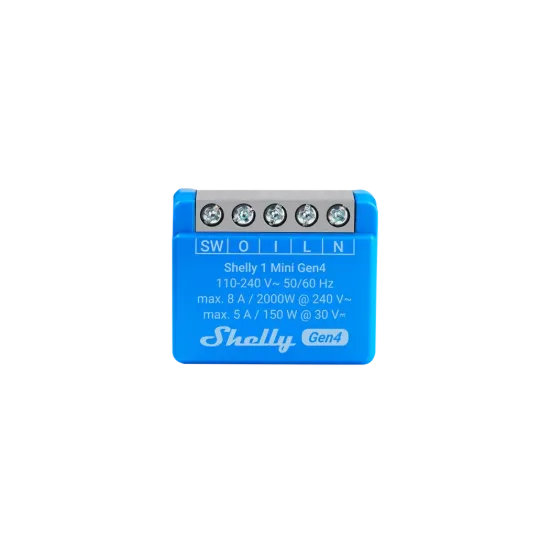
- Shelly 1 Mini Gen4: a small dry-contact relay for tight back boxes.
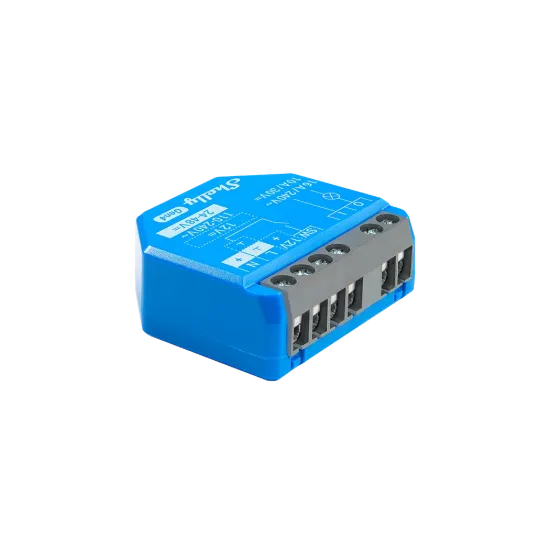
- Shelly 1 Gen4: a 16 A relay that fits behind an existing switch.
- Shelly Plus Plug UK: a UK plug-in with power metering and no wiring.
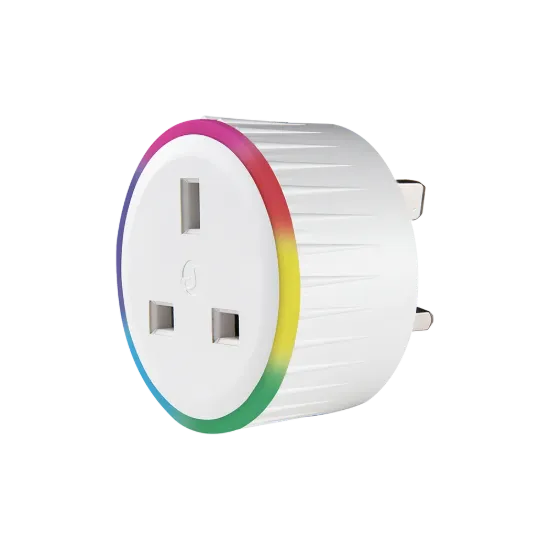
If you'd like to try Shelly with Home Assistant before anything goes in a back box, the Plus Plug UK is the easiest first step because it plugs straight in. When you're ready to add relays, browse the full range of Shelly relays, the Mini range and the Pro range. If you want to see what your circuits use, read Which Shelly energy monitor for a UK home?.
Check your back box: neutral or no neutral?
Before choosing a relay to fit behind a light switch, check what's in the back box. Most Mini relays need a neutral there. Many UK light switches don't have one, so this check matters.
If there's no neutral, the Shelly 1L Gen3 is the no-neutral option. Our guide to Shelly 1L vs Mini for no-neutral UK light switches explains the difference in detail.
Safety first
We recommend a qualified electrician for anything on mains. That includes any relay that goes behind a switch or into a back box. A plug-in device such as the Plus Plug UK needs no wiring, which is one reason it makes a good first device.
Do I need the Shelly cloud to use Home Assistant?
No. Home Assistant finds Shelly devices on your local network and controls them without the cloud.
Can I control Shelly through Home Assistant when I'm away from home?
Control away from home needs the internet. At home, Home Assistant control works on your local network even if the internet is down.
Does Shelly work with Apple Home as well as Home Assistant?
Yes. Apple Home works through Matter on Matter-certified devices, including the Gen4 range. Alexa and Google Home work through the Shelly cloud or through Matter on Matter-certified devices.
Start building your Shelly and Home Assistant setup
Start with one device and add more as you go. Shop the Shelly 1 Mini Gen4, the Shelly 1 Gen4 or the Shelly Plus Plug UK, or browse the full Shelly range.